Smart home device maker Aqara launched the Camera Hub G350 in March, the first Matter-certified smart camera on the market.
While Matter 1.5 includes cameras, Apple still doesn’t support Matter cameras, and Aqara’s camera still works with Apple Home. For Apple users, the Matter integration offers no benefits, but it does add cross-platform support for Google Home, Alexa, SmartThings, and more.
The Camera Hub G350 is my favorite home security camera I’ve tested to date, and not just because it’s wearing a cute bunny-ear outfit. It records in 4K and has zoom capabilities, plus it has motion tracking and can rotate 360 degrees.
The G350 has two cameras, and its design is similar to Lens EYES. If you don’t like the cute style, you can remove the silicone bunny hood that makes the G350 look like a traditional security camera.
Using the G350 with HomeKit limits you to the HomeKit feature set. You can watch the feed in the Home app, add the camera to an automation, and customize when the camera records and when it doesn’t use geo-blocking.
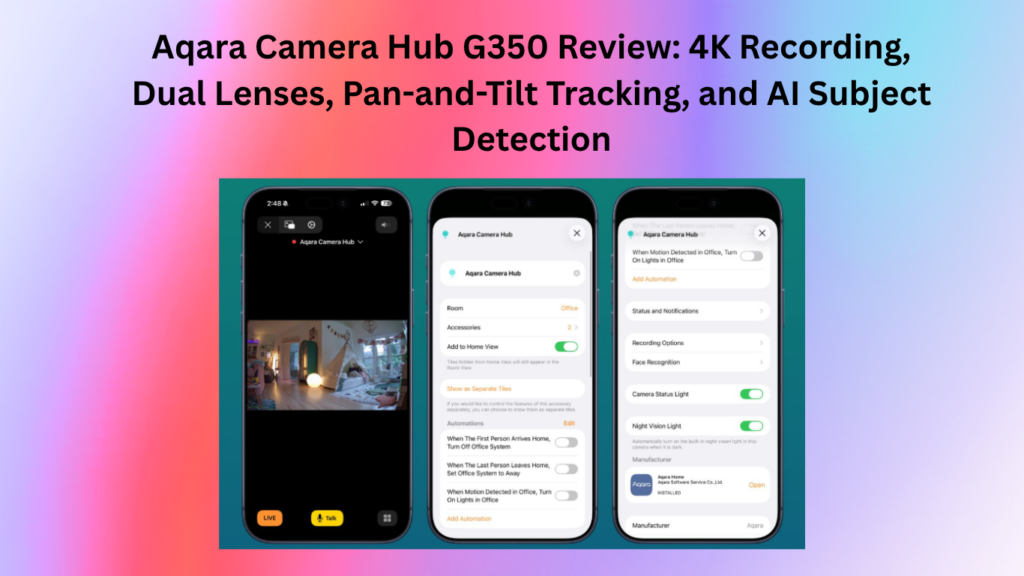
It supports motion notifications, can recognize people and animals to provide customized alerts, and includes facial recognition. Unfortunately, even though this is a high-definition camera, the Home app is limited to 1080p.
Tracking works well, and having a camera behind you can be a bit intimidating, so it can be a good deterrent to theft. It’s clear when it moves, as you can see, but there’s no audible sound when it unfolds. It’s meant to pan slowly, so there may be slight blurring in recordings when the camera moves or when you use the zoom feature.
Camera AI detection features
Of course, no smart camera discussion would be complete without covering their AI detection features. Aqara has incorporated several AI identifiers. While I understand locking AI video search and video summary behind a “HomeGuardian” subscription, vehicle and package identification has no place behind a paywall. A few features are in beta, labeled as Lab.
- AI Video Search ($$, Lab)
- AI Video Summary ($$, Lab)
- Personal identification
- Motion detection
- Face recognition
- Smile detection
- Animal identification
- AI voice recognition
- Gesture Recognition (Lab)
- Diagnosing lens occlusions
- Vehicle Identification ($$, Lab)
- package identifier ($$, lab)
- Fire detection ($$, lab)
If you opt for cloud video storage, you can select the types of events that will be sent to the cloud from the list below:
- Personal identification
- Face recognition
- Smile detection
- Animal identification
- AI voice recognition
- Diagnosing lens occlusions
- Motion detection
- Vehicle Identification ($$)
- Package Identifier ($$)
- Fire Detection ($$)
If facial recognition is your jam, you can upload a customized selfie to the Aqara app and it will be downloaded directly to the device’s camera for recognition. When a familiar face is detected, you can get an alert with a frame snapshot and a video snippet like “Derek detected” in the Aqara app.
Aqara also has Smart Notification Filtering, which is powered by AI. This feature is tied to their HomeGuardian subscription, so I wasn’t able to try it out.
The Aqara app lets you choose preset angles at which the camera moves quickly so you can see different areas of a room.
For those who don’t want to upload footage to the cloud, there’s an option to record to a 512GB microSD card. Footage can be saved to NAS, Apple Home’s iCloud storage, or Aqara’s Cloud Storage. You don’t need a subscription to Aqara’s Cloud Storage, but some features are locked behind one.
If you have other Aqara devices, the G350 acts as a hub for them. I have Aqara thermostats, so this serves as a hub for activity and improves connectivity among Aqara products. It is also a Thread border router and Matter controller for Thread devices. It can use a 2.4 GHz or 5 GHz connection.
The Camera Hub G350 is always meant to be plugged in, but for some reason Aqara doesn’t include a power adapter. There’s a USB-C cable, but no charger, so you’ll need to supply your own. It is a 10W USB-C power adapter or more.
Detailed Specifications:
- Wide-angle lens Video resolution: 3840×2160
- Wide angle lens angle: 133° (diagonal)
- Wide Angle Lens Focal Length: 2.8mm
- Telephoto lens Video resolution: 2560×1440
- Telephoto lens angle: 43°(diagonal)
- Telephoto Lens Focal Length: 8mm
- Aperture: f/1.6
- Frame rate: 20 fps
- Aspect ratio: 16:9
- Video Codec: H.264
- Wireless Protocols: Wi-Fi IEEE 802.11 b/g/n/ac/ax 2.4/5 GHz, Zigbee/Thread IEEE 802.15.4, Bluetooth
- Power input: 5V⎓2A
- Local storage: MicroSD card (not included). CLASS 10 or higher, supports up to 512GB storage.
The bottom line
With pan-tilt features and automatic tracking, the G350 is a great indoor camera. It’s perfect for a baby’s room or for tracking pets, but it also works well for general home care.
It supports local storage for those who don’t want to upload data to the cloud, and while some features are locked behind a subscription, all the most useful options are readily available at no extra cost.
Matter
As of mid-March 2026, Home Assistant Matter v1.5 will no longer be supported. However, they have announced that full Matter v1.5 support is coming, including cameras. However, due to the heavy lifting of the Matter v1.5 specification and the addition of native camera support to Home Assistant, I don’t expect full support for some time.
If you try to add the Camera Hub G350 to Home Assistant via Matter, it will be detected as a bridge. However, it has no entities, sensors or diagnostics. Until Home Assistant supports Matter v1.5 with cameras, I won’t bother entering the camera as a Matter device.
If you want to try entering the G350 via Matter, make sure you use the Aqara app to generate a new Matter pairing code. Do not attempt to scan the physical QR code as it will fail.
The Hub G350 can also act as a threaded border router. The camera was added to my existing Thread network during the Aqara app onboarding process. However, in the Home Assistant app on my iPhone, I had to reset my Apple TV to OTBR, which Home Assistant uses for credential management. To do that, tap on the three dots next to the Thread border router you want to use and tap “Use for Android + iOS Credentials”. Otherwise, I couldn’t insert new threaded devices into Home Assistant.
Thread border router support
As mentioned earlier, the Camera Hub G350 can be a wired border router. When you use the Aqara iOS app, it can integrate the G350 Thread border router into your existing Apple Home Thread network. Unfortunately, Aqara has only implemented Thread v1.3 and does not support TREL as of firmware 4.5.20_0020.0017.
Wired devices typically talk to each other over a low-power 802.15.4 radio mesh. TREL wraps those Thread packets in plain UDP/IP, so they can travel between Thread border routers over Wi-Fi or Ethernet. Apple TVs with tvOS 26 lag behind on Thread v1.3 but advertise TREL support. I hope Aqara will soon support Thread v1.4, which mandates TREL.
I didn’t see a way to disable OTBR functionality if you only want a hard OTBR, like Apple TV. After adding the Camera Hub G350, I experienced no Thread network instability with my 75+ Thread devices.
Matter v1.5 camera support
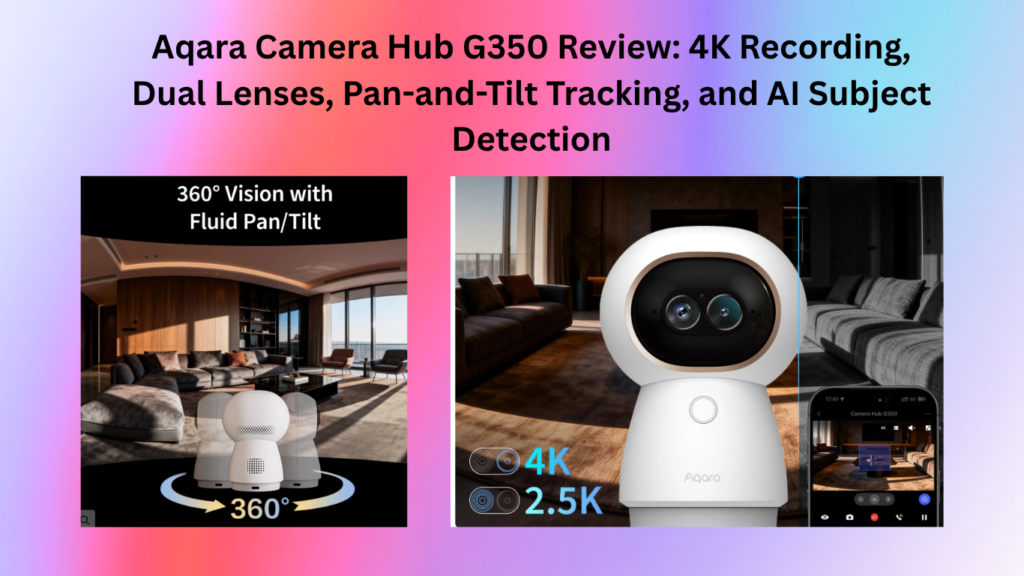
As of firmware 4.5.20_0020.0017, Aqara officially ships Matter v1.5 camera support. However, at this point, it appears that only Samsung SmartThings will ship with Matter camera support. Apple Home, Google Home, and Home Assistant are all backward-compatible and are hopefully supported in the future. The home support team has said support is coming but has not provided a timeline. I don’t use SmartThings, so I can’t comment on how well it works. I saw a mention that future firmware support should enable PTZ controls with SmartThings.
Not just following. It frames like a real cameraman. AI-powered automatic tracking, including our innovative close-up zoom, always keeps people or pets in frame. Also, its movement speed adjusts when you zoom.
Vision and automation
In the Aqara app, you have a number of controls for the G350 for both vision and automation. I personally do all the home automation on HomeMate. But it’s nice to know these options exist.
If you want to use the G350 as a trigger for Aqara automation, you have several options as well.
Summary
The Aqara Indoor Camera Hub G350 positions itself as the world’s first Matter-certified camera with dual lenses, 360° pan-tilt, 4K clarity, and two-way talk, with integrated smart home control out of the box. Aqara G350 received Matter v1.5 specification certification on February 10, 2026. It can also act as a wired border router and a Zigbee bridge. Completing the feature set is Wi-Fi 6 support for both the 2.4 GHz and 5 GHz bands.
As with previous Aqara cameras, the G350 is equipped with a wide range of AI features and supports local and cloud video storage. It supports Apple HomeKit secure video, so no cloud subscription is required if you want to use it within the Apple ecosystem.
The G350’s image quality is excellent, but night mode only supports grayscale and not full color. Automatic people tracking using the 360-degree pan base seems reliable, as does face detection. Although SmartThings is the only platform to support Matter v1.5 cameras as of this post, other ecosystems, such as Home Assistant, have Matter v1.5 support on their roadmap.
I was very impressed with the feature set and local video storage options. Aqara HomeGuardian offers a premium subscription that unlocks additional AI features and extended cloud storage. If you’re in the market for a high-quality camera that supports the latest Matter standards, the G350 is a great buy.